

Practical answers from our engineers
Over many years, Prosig's engineers have written hundreds of articles on noise and vibration measurement, from the basics of sensors and sampling to advanced analysis techniques. They're a practical reference for anyone working with test data, whether or not you use Prosig systems.
How do I upsample and downsample my data?
How to upsample and downsample data, and the possible pitfalls of this process.
This article covers how to upsample and downsample data and the possible pitfalls of this process. Before we cover the technical details, let us first explain what we mean by upsample and downsample and why we may need to use it.
Both these techniques relate to the rate at which data is sampled, known as the sampling rate. We will see below that the sample rate must be carefully chosen, dependent on the content of the signal and the analysis to be performed. Imagine we have some data which has already been sampled, from a particular test or experiment, and we now wish to re-analyse the data maybe using different techniques or to look for a different characteristic, and we don’t have the opportunity to repeat the test. In this situation, we can look at resampling techniques such as upsampling and downsampling.
Downsampling, which is also sometimes called decimation, reduces the sampling rate. Upsampling, or interpolation, increases the sampling rate. Before using these techniques, you will need to be aware of the following.
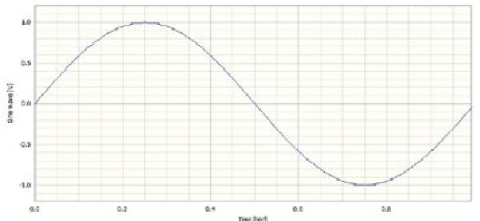
Figure 1: A 1 Hz sine wave sampled at 128 samples/second
What is the sampling rate?
The sampling rate is the rate at which our instrumentation samples an analogue signal. The sampling rate is very important when converting analogue signals to digital signals using an analogue-to-digital converter (ADC). Take a simple sine wave with a frequency of 1 Hz and a duration of 1 second as shown in Figure 1. The signal has 128 samples and therefore a sampling rate of 128 samples per second. Notice that the signal ends just before 1.0 seconds. That is because our first sample is at t = 0.0, and we would actually need 129 samples to span t=0.0 to t=1.0.
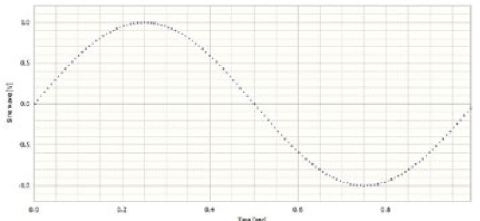
Figure 2: A 1 Hz sine wave sampled at 128 samples/second showing data points
At first, the signal appears to be very smooth, but upon closer inspection, it is possible to see that it is actually 128 points joined together by straight lines. These points are shown in Figure 2. We can see from this example that a sampling rate which is over 100 times greater than the signal frequency gives us a reasonably good visual representation of the signal.
Time Domain or Frequency Domain Analysis?
The time domain is probably the easiest to understand. This is where we view data in respect to time. Most people will usually view a captured data waveform first in the time domain. So our independent axis is time. The frequency domain is simply another way of viewing the same data, but in this case we look at the frequency content of the data. Now our independent axis is frequency, usually in Hertz (Hz). The Fourier Transform (FFT) is the most common analysis to take time-domain data and create frequency-domain data.
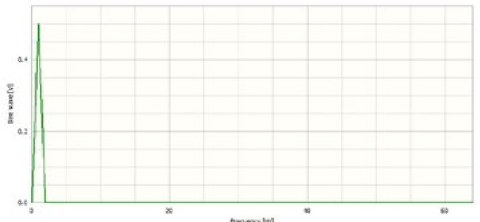
Figure 3: A 1 Hz sine wave sampled at 128 samples/second shown in the frequency domain
The following figure shows the signal from Figure 1 in the frequency domain as the result of an FFT transform. Note the range of the data on the x-axis in Figure 3. The data goes from 0 to 64 Hz, which is half the sample rate discussed previously. This is no coincidence and is carefully selected by DATS. The frequency which corresponds to half the sampling rate is known as the Nyquist Rate. [Note also that the amplitude is 0.5, exactly half the amplitude of the signal in Figure 1. This half amplitude is an effect of the type of frequency transform that has been used. The exact reasons for this are outside of the scope of this article.]
What is the Nyquist rate?
The Nyquist rate, created from research by Harry Nyquist, is the sampling rate at which you have to sample a signal in order to capture all the frequency content of interest.
How does the Nyquist rate apply?
Note the peak at 1 Hz in Figure 3 and recall that this was the frequency of our original sine wave. As we stated above, the Nyquist rate is the sample rate required to fully capture the frequency content of the signal. In our example above, the sample rate of 128 samples/second, or 128Hz, is more than enough to capture our 1Hz frequency content. Say that we have a sine wave of 50Hz. Nyquist theory states that we would need to sample this signal at least 100Hz in order for the 50Hz to be fully represented. However, that is the very minimum required. Generally, in the real world, a factor of at least 2.5 is used. Some will even go as high as 4 to allow an adequate margin. It will depend on your application.
What happens if we ignore the Nyquist rate?
Figure 4 shows a 50 Hz sine wave in the time domain, sampled at 2000 samples per second. Ignoring pixelation from the screen we can see a well-defined sine wave.
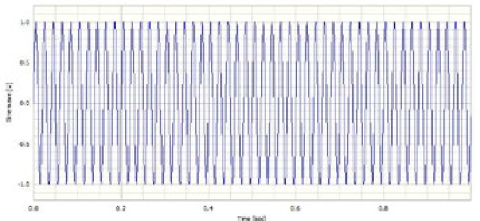
Figure 4: A 50 Hz sine wave sampled at 2000 samples/second
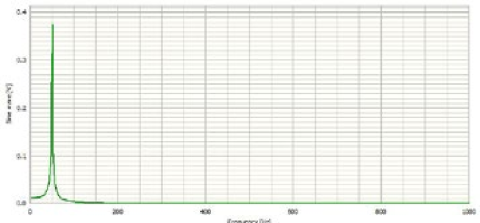
Figure 5: A 50 Hz sine wave sampled at 2000 samples/second shown in the frequency domain
Figure 5 shows a 50 Hz sine wave in the frequency domain, sampled at 2000 samples per second. Again, we can see a well-formed peak at 50 Hz, as we would expect.
Figure 6 shows the same 50 Hz sine wave in the time domain, sampled at 125 samples per second. This is 2.5 × 50 Hz, the minimum practical sample rate to capture the frequency in question. Figure 7 also shows a 50 Hz sine wave in the frequency domain, sampled at 125 samples per second. Some degeneration of the signal can now be seen in the time domain. The frequency domain still looks acceptable, as the peak is still around 50Hz. However, note the loss in magnitude of the peak in the frequency domain.
Figure 8 shows the 50 Hz sine wave again, but now sampled at 75 samples per second. This is below the minimum required to successfully represent the original signal. Figure 9 shows the same data in the frequency domain. As you can see, the time domain display no longer looks like the original signal. However, from a quick cursory look and without prior knowledge of the signal content, it could easily be assumed to be plausible. The frequency domain no longer contains the information we expect. The frequency domain graph suggests a sine wave of 25Hz. The cause of the erroneous reading is a phenomenon called aliasing. The sample rate is no longer high enough to represent the original signal successfully.
The concept of the Nyquist rate and aliasing, is equally important when we consider resampling the data by downsampling.
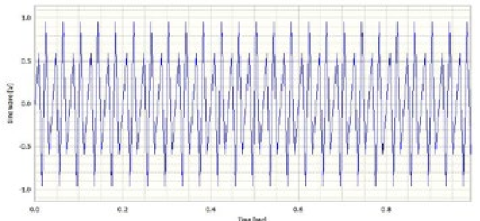
Figure 6: A 50 Hz sine wave sampled at 125 samples/second
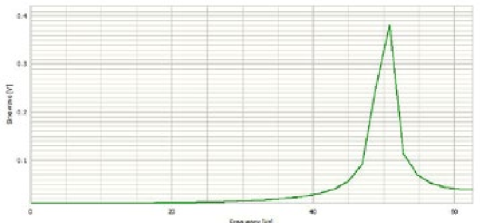
Figure 7: A 50 Hz sine wave sampled at 125 samples/second shown in the frequency domain
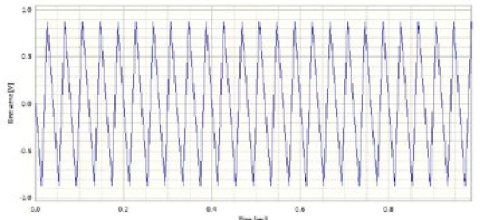
Figure 8: A 50 Hz sine wave sampled at 75 samples/second
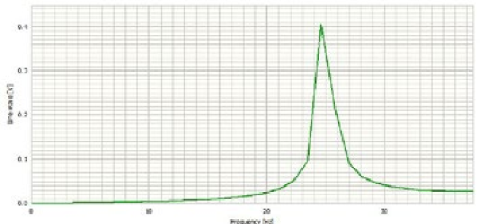
Figure 9: A 50 Hz sine wave sampled at 75 samples/second shown in the frequency domain
Downsampling
The idea of downsampling is to remove samples from the signal, whilst maintaining its length with respect to time. For example, a time signal of 10 seconds in length, with a sample rate of 1024Hz or samples per second, will have 10 x 1024 or 10240 samples. This signal may have valid frequency content up to 512Hz or half the sample rate as we discussed above. If it was downsampled to 512 Hz, then the frequency content would now be reduced to 256Hz, due to the Nyquist theory. However, if there were frequencies present in the original signal between 256 and 512 Hz, they would be subject to aliasing and would cause incorrect frequencies to be displayed in the frequency domain. So, in order to downsample the signal, we must first low-pass filter the data to remove the content between 256Hz and 512Hz before it can be resampled.
Upsampling
The purpose of upsampling is to add samples to a signal, whilst maintaining its length with respect to time. Consider again a time signal of 10 seconds length with a sample rate of 1024Hz or samples per second that will have 10 x 1024 or 10240 samples. As above, this signal may have valid frequency content up to 512Hz, half the sample rate. The frequency content would not be changed if the data were upsampled to 2048Hz. No content has been added to the signal so there would be no aliasing issues. The effect of upsampling is to improve resolution in the frequency domain.
Important note: If a signal is under-sampled initially and is subject to aliasing, upsampling will not resolve this.
Have a question about this article? Email our support team
Browse all articles
Our full library of articles, tutorials and how-tos is available on the Prosig Noise and Vibration Blog.
How impact hammer testing reveals a structure's natural frequencies, damping and mode shapes, and how to get reliable results.
Why you might change the sample rate of your data, and how to do it without introducing errors such as aliasing.
What a frequency response function is, how it's measured, and how to read one to understand a structure's behaviour.
How acceleration, velocity and displacement relate to each other, with simple conversion formulas and the pitfalls to avoid.
A guide to measurement microphones: free-field, pressure and random-incidence responses, polarisation and size, and how to choose the right one.
Why window functions change the values in your spectrum, and when to apply amplitude correction or energy correction.
Have a question we haven't answered?
Get the latest DATS software updates and patches for your licensed system.
Watch Prosig systems in action, with tutorials and explainer videos on our YouTube channel.
Open and view DATS data files with our free viewer, no licence needed.
Our free 7th edition guide to sensors, measurement and analysis.
Tell us how we’re doing. Your feedback helps us improve our products and support.

From aerospace and automotive testing to condition monitoring and human vibration research, explore how Prosig's measurement solutions are applied across demanding engineering environments.
Worldwide support, local expertise
Our support team is based in the UK, with offices in the USA and a network of distributors worldwide providing local sales and support.

Our sites

Distributors